AI Model Comparisons
Regex to parse CSV with quoted commas: an AI test
November 17, 2026 · 5 min

Regex can parse CSV with quoted commas in a small, known sample, but that doesn't make it a CSV parser. In EVA's November 16, 2026 test, GPT-6.1 Sol, Claude Opus 5.5, and Gemini 4 Argon all returned correct JSON for our sample; only Opus also named Python's csv module as the safer choice.
Can a regex parse CSV with quoted commas?
For the input we gave it, yes. All three regex answers kept "ships, today" as one field and turned "said ""go""" into said "go". The comma in the first value belongs to the note, and the doubled quotes are quotation marks inside the field.
Line breaks are where it fails. RFC 4180 says: "Fields containing line breaks (CRLF), double quotes, and commas should be enclosed in double-quotes." A parser that reads one physical line per record breaks on that case, and our sample never tested it.
Before picking a method, open a real export from the source system. Look at the delimiter, how quotes are escaped, and whether any field wraps onto a second line. The Python CSV documentation puts the standard library's job plainly: "The csv module implements classes to read and write tabular data in CSV format."
The test: one prompt, three models
We sent this prompt once to each model in EVA Multi Chat on November 16, 2026. It asks for regex on purpose and caps the answer at 180 words:
Convert this CSV to JSON using regex in Python. The quoted fields contain commas. Return runnable Python and the resulting JSON, under 180 words. CSV: name,note then a newline then Ada,"ships, today" then a newline then Lin,"said ""go""". Keep all values as strings.
That describes this file:
name,note
Ada,"ships, today"
Lin,"said ""go"""
We ran each model's Python unchanged and compared the output with:
[{"name":"Ada","note":"ships, today"},{"name":"Lin","note":"said \"go\""}]
All three matched. The difference was what each answer said around the code:
| Model | Sample JSON correct? | Limits stated? | Safer alternative named? | Alternative code given? |
|---|---|---|---|---|
| GPT-6.1 Sol | Yes | Quoted newlines | No | No |
| Claude Opus 5.5 | Yes | Quoted newlines | Python csv module | No |
| Gemini 4 Argon | Yes | None stated | No | No |
Sol wrote that its code "assumes fields contain no embedded newlines." Opus covered the same limit and added: "For real-world CSV, Python's built-in csv module is safer." Argon returned code and JSON with no note about limits.
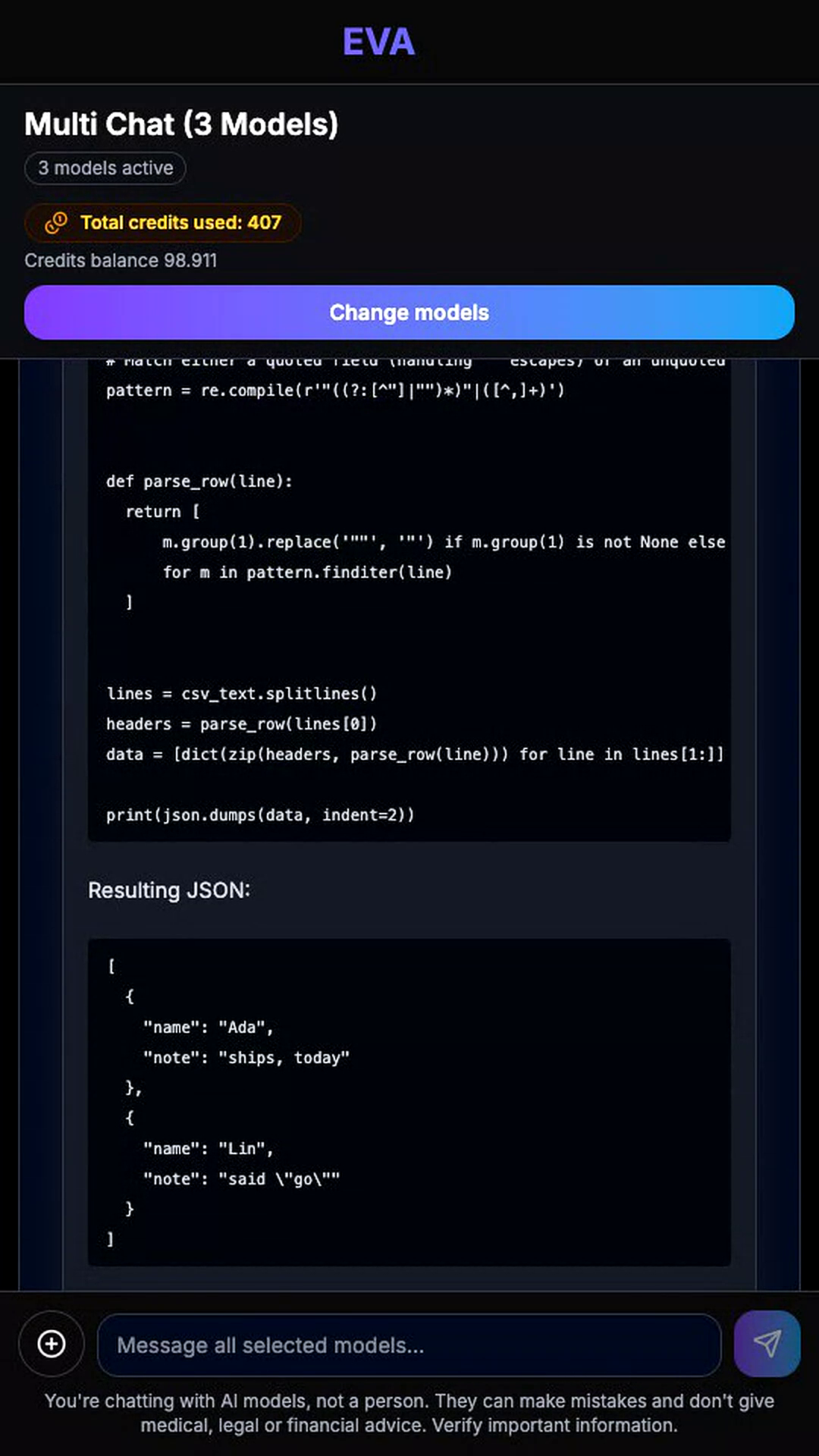
Actual EVA capture, November 16, 2026. Long code lines are clipped.
Our takeaway: the JSON was the easy part; the useful answer was the one that told us where its code stops. Even Opus left a gap. It named the better parser but gave no code for it, so a developer would still have to ask. We didn't try longer prompts or a prompt that asked for the standard library, and we didn't measure speed or credits per model, so this says nothing about which model codes best overall.
What to ask for in an import job
For a real import, we'd ask for:
- quoted commas kept in their field and doubled quotes decoded;
- every value kept as a string, with no type guessing;
- quoted line breaks handled, if the source can produce them;
- unsupported inputs listed, plus runnable code for any parser the answer recommends.
A short follow-up gets you most of that:
State the method's limits. If a standard library tool fits better, give that code too. Preserve the supplied values as strings. Explain how the parser treats quoted line breaks, and separate tests you ran from tests you only recommend.
Keep the model's original answer next to the script you actually run. If you fix the script yourself, note the fix, or you'll end up crediting the model for it. If regex is a hard requirement, write down why: a one-off exercise and a nightly customer import need different code. Our AI output acceptance criteria checklist and guide to reviewing AI-generated code with multiple models go further on both.
How do you convert CSV to JSON in Python without regex?
Use csv.DictReader for the header and fields, then json.dumps for the rows. We wrote this snippet ourselves; it isn't from any model in the test.
import csv
import io
import json

text = 'name,note\nAda,"ships, today"\nLin,"said ""go"""\n'
rows = list(csv.DictReader(io.StringIO(text, newline="")))
print(json.dumps(rows, ensure_ascii=False, separators=(",", ":")))
It printed exactly the expected JSON above. The JSON documentation shows json.dumps escaping quotation marks inside strings. Set the delimiter and quoting to match your export, and decide what happens to short or broken rows before this runs on real data.
Sources (RFC 4180, Python csv and json docs) accessed November 16, 2026.
To see which answers admit what their code won't handle, run your own prompt in EVA.